2025-12-02, 07:27 AM
Hello,
In the MYBB forum system, under modcp.php?action=modqueue&type=threads, the moderation queue lists threads and posts awaiting approval. While there are options to approve, delete, or ignore these items, the post content is currently displayed in raw BBCode format, which makes it difficult to understand the full message at a glance.
Additionally, there is no option to edit the content before approval. This limitation can be problematic when moderators need to correct formatting, remove inappropriate elements, or clarify posts before making them visible to the public.
I would like to suggest the following improvements to the moderation queue interface:
Display the full post content with BBCode rendered properly (or an option to toggle between raw BBCode and rendered view).
Add an "Edit" button that opens the post in a rich text editor (similar to the full post editor), allowing moderators to make necessary changes before approval.
These enhancements would greatly improve moderation efficiency
Best regards
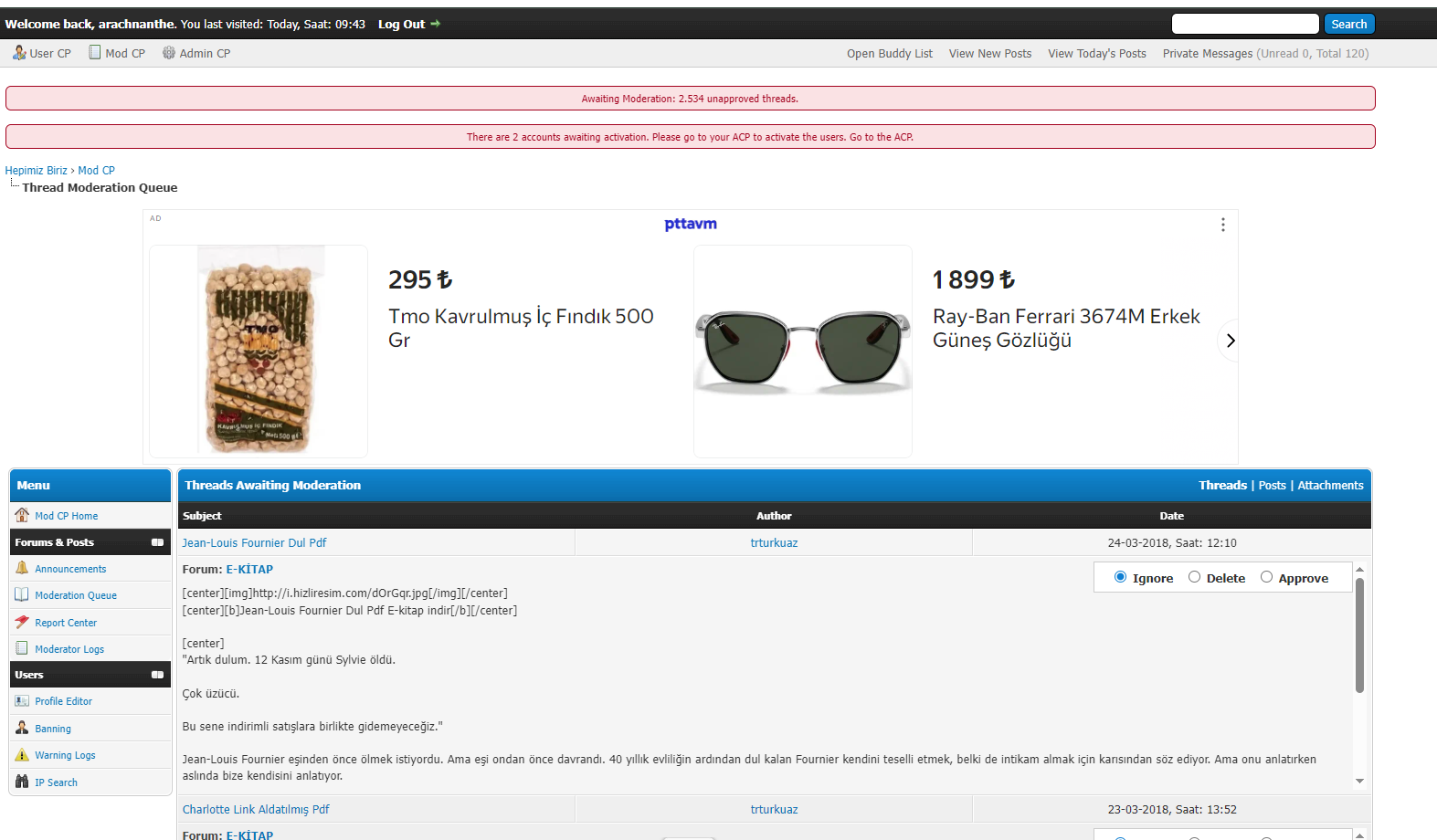
In the MYBB forum system, under modcp.php?action=modqueue&type=threads, the moderation queue lists threads and posts awaiting approval. While there are options to approve, delete, or ignore these items, the post content is currently displayed in raw BBCode format, which makes it difficult to understand the full message at a glance.
Additionally, there is no option to edit the content before approval. This limitation can be problematic when moderators need to correct formatting, remove inappropriate elements, or clarify posts before making them visible to the public.
I would like to suggest the following improvements to the moderation queue interface:
Display the full post content with BBCode rendered properly (or an option to toggle between raw BBCode and rendered view).
Add an "Edit" button that opens the post in a rich text editor (similar to the full post editor), allowing moderators to make necessary changes before approval.
These enhancements would greatly improve moderation efficiency
Best regards