



2026-09-09, 12:04 AM
(This post was last modified: 2026-10-19, 02:58 PM by SickProdigy. Edited 3 times in total.)
Space Cadet
Space Cadet is a dark responsive theme for MyBB 1.8.41, built as a child-style export from the MyBB Master Style. It keeps MyBB's core structure familiar while modernizing the layout, spacing, typography, navigation, post views, profile pages, private messages, User CP, Mod CP, calendar pages, and mobile experience.
I originally rebuilt this as a copy of revolution gaming theme with GPLv3 license. You technically can't change revolution gaming theme and charge vip or anything for the site at that point because of their license they chose. So i introduce you guys to Space Cadet. After working and working for about a month, i decided this would look better my way and more fluent. Modernized it. Charge what you want, do what you want with it. (under GPLv3 license of course) Which just requires you to keep the source open-source and free. If you remove my footer tag, I won't provide support for your forum.
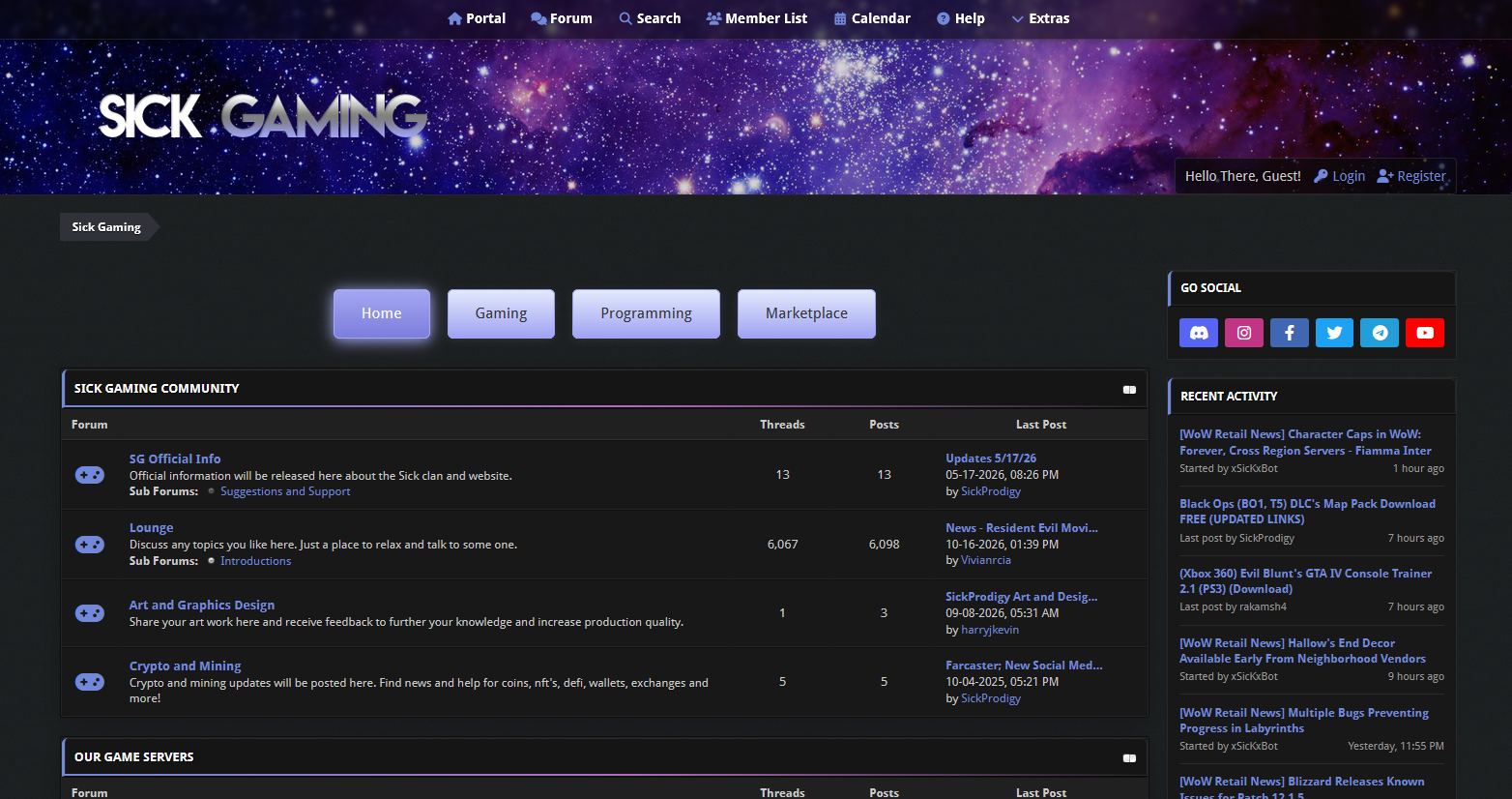
Features
- Dark forum-focused design
- Responsive desktop, tablet, and mobile layouts
- Refined index, portal, forum display, thread list, and postbit views
- Improved member profiles and member list
- Better UserCP and private message layouts
- Styled ModCP pages and moderation controls
- Styled calendar, search, help, and portal pages (Mobile friendly!)
- Local Droid Sans webfonts
- Self-hosted Font Awesome assets
- Included Space Cadet images and background textures
- Importable
- Built for MyBB 1.8.41
Installation
1. Upload the included
2. In Admin CP, go to Templates & Style → Themes → Import a Theme.
3. Import
4. Set Space Cadet as your default theme, or assign it to a test account first.
5. Hard-refresh your browser and clear any cache/CDN cache if assets do not update immediately.
Upgrade Notes
If you previously tested an older Space Cadet build, replace the
Compatibility
- MyBB 1.8.41
- Modern desktop and mobile browsers
Notes
Space Cadet is designed to stay close enough to MyBB's stock structure that common forum workflows still feel familiar. It focuses on readability, cleaner spacing, responsive tables, polished controls, and a more cohesive dark interface rather than replacing MyBB with a completely different layout.
Other plugins that compliment this theme well:
Tab Sub Menu (Custom tab menu above forum index): https://community.mybb.com/mods.php?acti...w&pid=1727
Staff Tools (Show Posts/Threads that have already been warned + other options): https://community.mybb.com/mods.php?acti...w&pid=1729
Spam Preventer (Reduce bot/ai spam): https://community.mybb.com/mods.php?acti...w&pid=1730
Avatar Gallery (New Users can choose from default avatars): https://community.mybb.com/mods.php?acti...w&pid=1749
Social Meta Tags (Make your links look nice on discord,fb,x,etc): https://community.mybb.com/mods.php?acti...w&pid=1732
Rotating Ads (Charge people to host ads and provide metrics on those ads): https://community.mybb.com/mods.php?acti...w&pid=1736
Download Space Cadet:
https://community.mybb.com/mods.php?acti...w&pid=1731
or
https://github.com/SickProdigy/mybb_spac...e/releases
Space Cadet is a dark responsive theme for MyBB 1.8.41, built as a child-style export from the MyBB Master Style. It keeps MyBB's core structure familiar while modernizing the layout, spacing, typography, navigation, post views, profile pages, private messages, User CP, Mod CP, calendar pages, and mobile experience.
I originally rebuilt this as a copy of revolution gaming theme with GPLv3 license. You technically can't change revolution gaming theme and charge vip or anything for the site at that point because of their license they chose. So i introduce you guys to Space Cadet. After working and working for about a month, i decided this would look better my way and more fluent. Modernized it. Charge what you want, do what you want with it. (under GPLv3 license of course) Which just requires you to keep the source open-source and free. If you remove my footer tag, I won't provide support for your forum.
Features
- Dark forum-focused design
- Responsive desktop, tablet, and mobile layouts
- Refined index, portal, forum display, thread list, and postbit views
- Improved member profiles and member list
- Better UserCP and private message layouts
- Styled ModCP pages and moderation controls
- Styled calendar, search, help, and portal pages (Mobile friendly!)
- Local Droid Sans webfonts
- Self-hosted Font Awesome assets
- Included Space Cadet images and background textures
- Importable
space-cadet-theme.xml- Built for MyBB 1.8.41
Installation
1. Upload the included
images/space-cadet/ folder to your forum's images/space-cadet/ directory.2. In Admin CP, go to Templates & Style → Themes → Import a Theme.
3. Import
space-cadet-theme.xml.4. Set Space Cadet as your default theme, or assign it to a test account first.
5. Hard-refresh your browser and clear any cache/CDN cache if assets do not update immediately.
Upgrade Notes
If you previously tested an older Space Cadet build, replace the
images/space-cadet/ folder and import the new XML. Test on a non-production copy or test account first if you have customized templates locally.Compatibility
- MyBB 1.8.41
- Modern desktop and mobile browsers
Notes
Space Cadet is designed to stay close enough to MyBB's stock structure that common forum workflows still feel familiar. It focuses on readability, cleaner spacing, responsive tables, polished controls, and a more cohesive dark interface rather than replacing MyBB with a completely different layout.
Other plugins that compliment this theme well:
Tab Sub Menu (Custom tab menu above forum index): https://community.mybb.com/mods.php?acti...w&pid=1727
Staff Tools (Show Posts/Threads that have already been warned + other options): https://community.mybb.com/mods.php?acti...w&pid=1729
Spam Preventer (Reduce bot/ai spam): https://community.mybb.com/mods.php?acti...w&pid=1730
Avatar Gallery (New Users can choose from default avatars): https://community.mybb.com/mods.php?acti...w&pid=1749
Social Meta Tags (Make your links look nice on discord,fb,x,etc): https://community.mybb.com/mods.php?acti...w&pid=1732
Rotating Ads (Charge people to host ads and provide metrics on those ads): https://community.mybb.com/mods.php?acti...w&pid=1736
Download Space Cadet:
https://community.mybb.com/mods.php?acti...w&pid=1731
or
https://github.com/SickProdigy/mybb_spac...e/releases